 5.0
5.0
 4.9
4.9
 HubSpot
 4.9
4.9


Technical SEO is rarely the reason a B2B campaign starts. But it is very often the reason it stops working.
In B2B, you are not chasing volume. You are chasing the right visitor. One missed opportunity could mean losing a deal worth thousands or even six figures.
Now imagine this:
A decision-maker lands on your solution page
The page takes too long to load
Or worse, it does not render properly
They leave. You never even know they were there.
That is what technical SEO issues look like in real life.
This technical SEO audit checklist is designed to help you identify and fix those invisible problems before they cost you pipeline.
Phase 1: Crawlability and Indexation
If search engines cannot access your pages, nothing else matters.
1. Robots.txt Check
_V2lnM3WkK.png)
What to check
Ensure your robots.txt file is not blocking important sections like /blog/, /solutions/, or /services/.
How to check
- Open: yourdomain.com/robots.txt
- Use Google Search Console robots tester
Why it matters (B2B): A single disallow rule can wipe out your entire organic lead flow overnight.
2. XML Sitemap Health
What to check
Your sitemap should only include:
- indexable pages
- 200 status pages
How to check
- Submit sitemap in Google Search Console
- Crawl with Screaming Frog
Why it matters: Google prioritizes what you show in your sitemap. If it includes junk, your important pages get ignored.
3. Index Coverage Issues
What to check
Pages marked:
- Crawled but not indexed
- Discovered but not indexed
How to check
- Google Search Console → Indexing → Pages
Why it matters: Your best pages may exist but are invisible in search.
Phase 2: Site Architecture and Funnel Flow
Your website should guide both users and search engines.
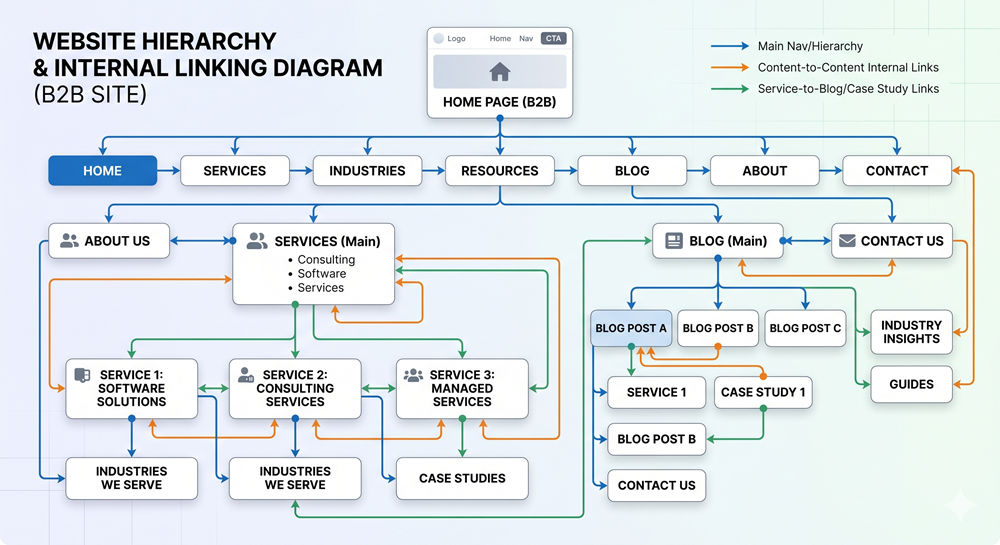
4. Orphan Pages
What to check
Pages with zero internal links.
How to check
- Screaming Frog crawl
- Site audit tools
Why it matters: If nothing links to a page, Google treats it as unimportant.
5. Internal Linking Strategy
What to check
Do blogs link to:
- service pages
- demo pages
- high-intent pages
Why it matters: Internal links pass authority and guide users toward conversion
6. Gated Content Setup
What to check
Ensure:
- landing page is indexable
- PDF is not indexed directly
Why it matters: If users land directly on PDFs, you lose leads.
Phase 3: Performance and Experience
_1LgZzw7hu.png)
Speed is not just technical. It is psychological.
7. Core Web Vitals
What to check
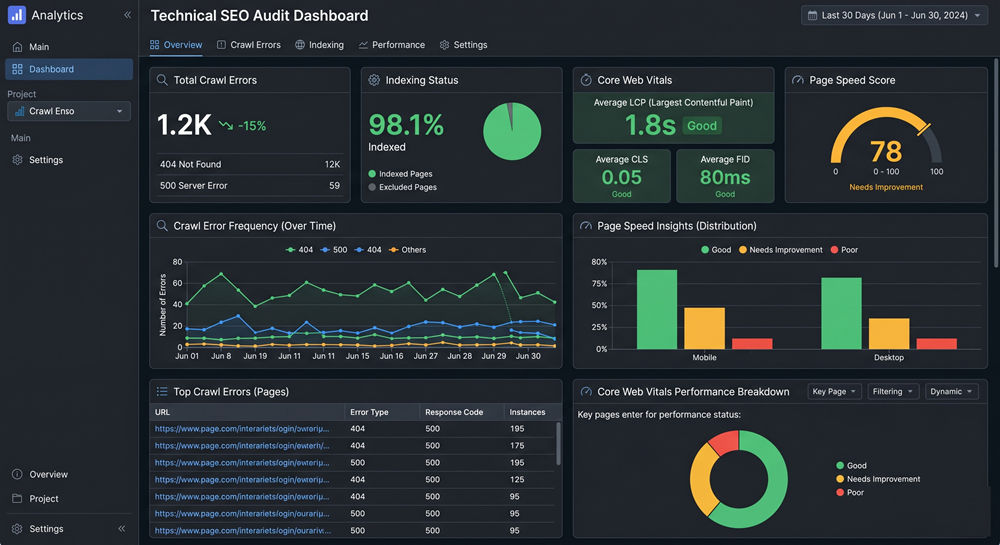
- LCP under 2.5 seconds
- CLS minimal
Tools
- PageSpeed Insights
- Google Search Console
Why it matters: Slow pages reduce trust and increase bounce rates.
8. Mobile Experience
What to check
- forms working
- layout stable
- buttons clickable
Why it matters: Many B2B journeys start on mobile, even if they convert later on desktop.
9. HTTPS and Security
What to check
- SSL active
- no mixed content
Why it matters: Security is a baseline trust signal in B2B.
Phase 4: Technical Health
10. Broken Links and Redirects
What to check
- 404 pages
- redirect chains
Tools
- Screaming Frog
- Ahrefs
Why it matters: Broken journeys = lost trust.
11. Canonical Tags
What to check
Each page should have a clear canonical.
Why it matters: Prevents duplicate content confusion.
12. Duplicate Content
What to check
Similar pages targeting same keywords.
Why it matters
Google may not rank any of them properly.
Phase 5: Rendering and JavaScript
13. JavaScript Content Visibility
What to check
Is content visible without full JS execution?
Tools
- URL Inspection Tool
- View source vs rendered HTML
Why it matters: If Google cannot see your content, it does not exist.
Technical SEO Tools You Should Use
- Google Search Console for indexing and errors
- Screaming Frog for crawling and audits
- PageSpeed Insights for performance
- Ahrefs or SEMrush for technical SEO analysis
These tools help identify real technical SEO issues quickly.
Common Technical SEO Issues in B2B Websites
- orphan case studies
- broken redirects after redesign
- slow CMS templates
- duplicate service pages
- unlinked landing pages
Most of these happen silently.
That is why audits matter.
When You Should Run a Technical SEO Audit
Run this checklist when:
- traffic drops
- leads decline
- after redesign
- before migration
- scaling SEO efforts
Final Thought
Technical SEO is not a checklist you run once. It is the foundation that everything else depends on. If that foundation is weak, your growth will always plateau.
Stop Losing Leads Without Knowing
Most technical SEO issues do not show up as obvious problems. They quietly reduce your visibility, traffic, and conversions. Parkyd Digital helps B2B companies identify and fix these hidden gaps before they impact revenue.