 5.0
5.0
 4.9
4.9
 HubSpot
 4.9
4.9

TL;DR
HubSpot’s Fall 2026 self-updating CRM automates activity logging and deal updates, but applying it to a messy portal amplifies bad data. Clean your data model, deduplicate records, and define stage criteria before turning on auto-capture.
On September 16, 2026, at its Unbound conference in Boston, HubSpot used the Fall 2026 Spotlight to announce what it calls one of its most foundational releases in years. The headline feature for anyone who runs a CRM is the self-updating Smart CRM: HubSpot now captures every call, email and meeting automatically and keeps contact, company and deal records current without reps typing anything in.
If you have ever opened a HubSpot portal and found 40 percent of your contacts missing a company, three versions of the same customer, and deal stages that have not moved since spring, that pitch sounds like relief. Finally, the CRM maintains itself.
Here is the part HubSpot’s keynote did not spend much time on. A self-updating CRM is only as good as the structure it updates into. Automation applied to a messy portal does not clean the mess. It fills the mess faster, with more confidence, and then hands that data to AI agents that act on it. This article walks through what HubSpot actually shipped, what it genuinely fixes, where it will make dirty data worse, and the seven things we at Parkyd Digital check before switching it on for a client.
What HubSpot actually announced in the Fall 2026 Spotlight
The Fall 2026 release is organized around a concept HubSpot calls Growth Context: everything the platform knows about your customers, your team and your business, used as shared memory for Breeze Assistant and every AI agent. Three pieces matter for data quality (full list on the official Spotlight page).
Definition
HubSpot Self-Updating CRM is an automated data capture engine released in Fall 2026 that continuously records emails, calls, and meeting logs while suggesting property updates without manual rep entry.
1. The self-updating Smart CRM
Once email and calendar are connected, HubSpot captures conversations, emails and meetings automatically and keeps deal records aligned with what is currently happening. On deals, it goes a step further and suggests property updates such as deal stage, amount and next step straight from a follow-up email, which the rep confirms. For service teams, the same engine keeps customer records current so Customer Agent and support reps start from full history. HubSpot’s own framing: it starts from what HubSpot already knows about your business, and the rest fills in as your team works.
2. Context Home
Context Home is a new control panel where you can view and manage what HubSpot knows about your business: brand positioning, ideal customer profile, team roles and ways of working. It also shows where that picture is incomplete. This is the single most important screen in the release for a business with data problems, because it is where you find out what the AI has inferred about you from a messy portal.
3. A quieter set of data quality tools
Buried in the 134 product updates are the features that actually do the cleaning:
- Data model health check: automated checks on objects, properties and associations with recommended fixes.
- Primary record merge rules: set which record wins in a merge, with property-level overrides (public beta).
- Duplicate similarity scores, merge preview and custom duplicate rule assistance: see how closely a pair matches and what the merged record will look like before you commit.
- Higher duplicate pair limits: built for larger portals that have outgrown the old duplicates tool.
- Centralized data model management: objects, properties and associations managed in one place.
HubSpot’s own numbers make the stakes clear. Across its customer base, teams using AI with high-quality context generated 5x more MQLs, closed 4.7x more deals and resolved 6.8x more tickets than teams using AI with low-quality context. Treat that as vendor data, but the direction is not controversial: the AI layer rewards clean context and punishes bad context.
What dirty data actually looks like in a B2B HubSpot portal
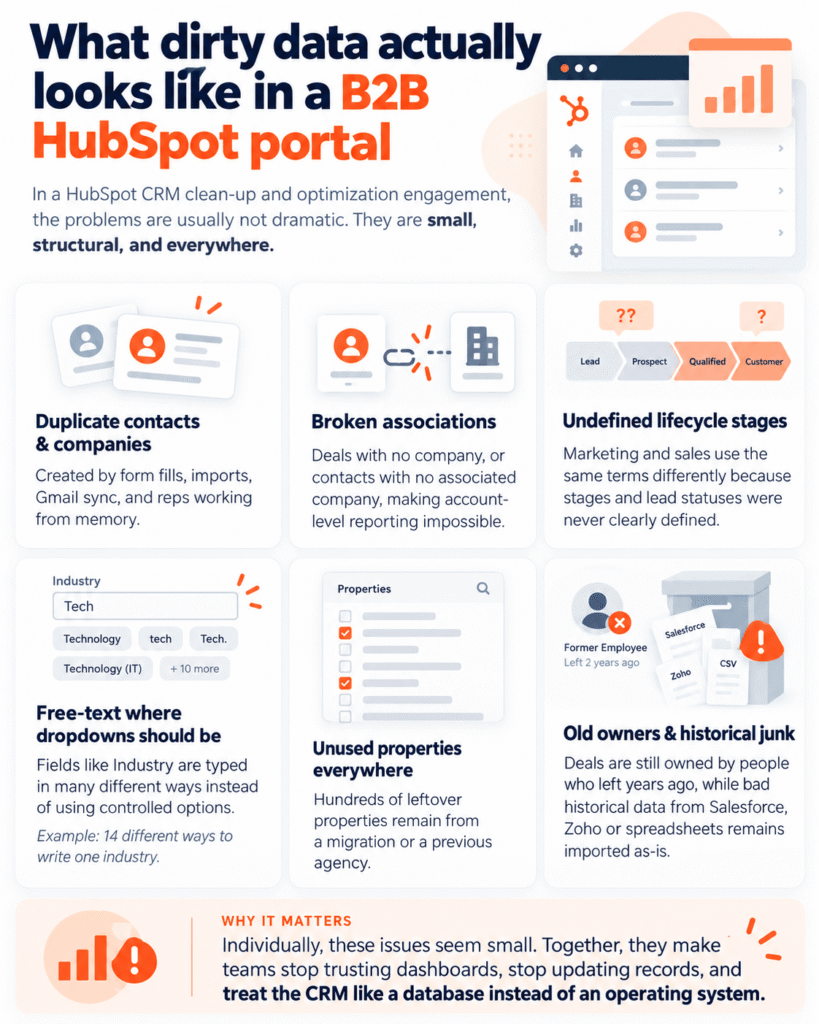
When we run a HubSpot CRM clean-up and optimization engagement, the problems are rarely dramatic. They are small, structural and everywhere:
- Duplicate contacts and companies created by form fills, imports, Gmail sync and reps working from memory.
- Deals with no associated company, or contacts with no associated company, so account-level reporting is impossible.
- Lifecycle stages and lead statuses that were never defined in writing, so marketing and sales use the same words to mean different things.
- Free-text properties where a dropdown should be (Industry typed 14 different ways).
- Hundreds of properties nobody uses, left over from a migration or a previous agency.
- Deals owned by people who left the company two years ago.
- Historical junk from a Salesforce, Zoho or spreadsheet migration that was imported as-is.
Individually these are annoyances. Together they are the reason leadership stops trusting the dashboards, reps stop updating records, and the CRM becomes a database instead of an operating system.
What the self-updating CRM fixes, and what it quietly makes worse
The honest answer is that it fixes the problems caused by people not typing, and leaves untouched (or worsens) the problems caused by bad structure. Side by side:
What it genuinely solves | What it quietly amplifies or ignores |
Activity logging gaps. Captures inbox and calendar activity automatically, so the biggest source of CRM decay (reps not logging) largely disappears. | Unmerged duplicates. Logs activity against whichever matching record HubSpot finds first, so one buyer across three records becomes three fragmented timelines, and AI agents reason from the wrong one. |
Deal stage drift. Deal Progression reads the thread and proposes the stage change, amount update and next step, instead of deals sitting in Proposal Sent for months. | Broken data model. Cannot associate a deal to a company that was never linked, pick a lifecycle stage you never defined, or populate a property you never created. |
Missing meeting notes. Meeting Notetaker and automatic capture put conversation context on the record, not the rep’s memory of it a week later. | Wrong stage criteria. Recommends stage moves based on how the pipeline is configured. If stages do not match how buyers actually move, it confidently pushes deals into the wrong stage. |
Stale customer context in service. Support and Customer Agent start from the full relationship history rather than the most recent ticket. | Unmanaged logging rules. Without exclusion rules, personal threads, internal chatter and vendor emails get captured too. More data is not better data. |
Rep time. Hours per week of manual entry come back to selling and support. | Historical junk. Auto-capture is forward-looking. It does nothing about the 18,000 records imported as-is in 2023. |
The Parkyd Rule: Automation on top of dirty data gives you dirty data faster and with more confidence. Clean first, then automate.
The 7-point pre-flight checklist before you turn it on
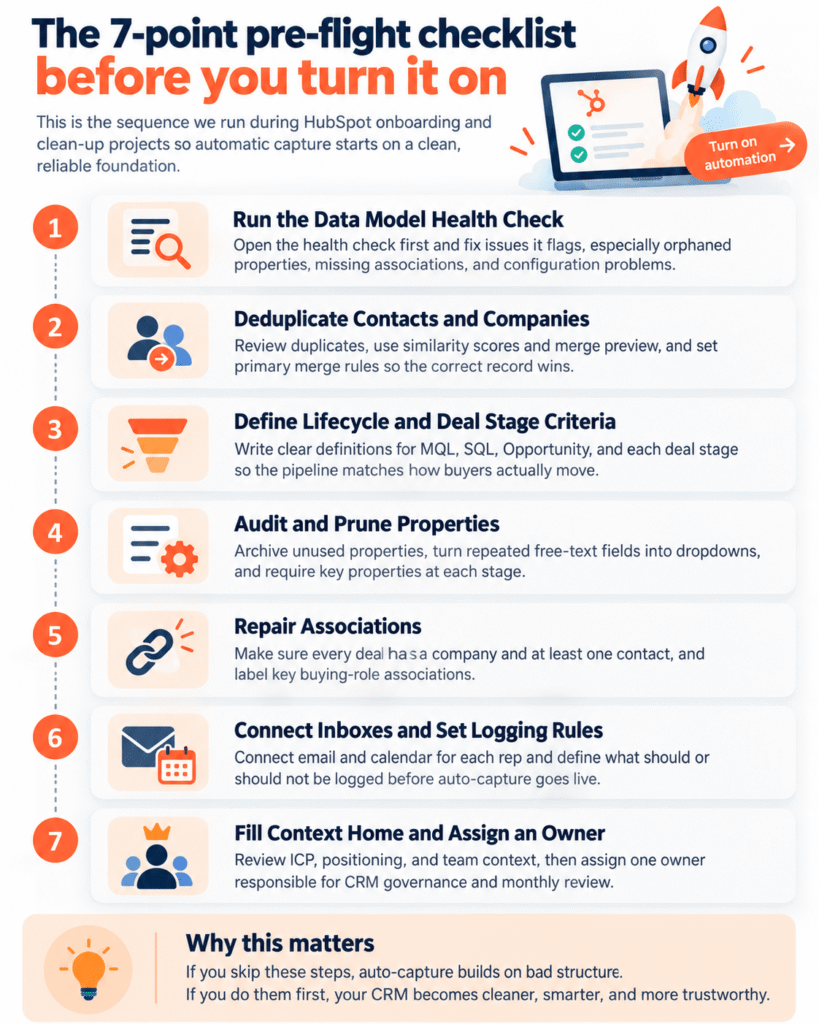
This is the sequence we run during HubSpot onboarding and clean-up projects. Most of it uses tools HubSpot shipped in this same release, so you do not need a third-party platform to get started.
- Run the Data Model Health Check: Open the health check and fix what it flags before anything else. It will surface orphaned properties, missing associations and configuration problems that automatic capture will otherwise build on top of.
- Deduplicate Contacts and Companies: Use the manage duplicates tool with similarity scores and merge preview. Set primary record merge rules first so the right record wins and the right properties survive. For portals with tens of thousands of records this is a project, not an afternoon, and it is the step most teams skip.
- Define Lifecycle and Deal Stage Criteria: Write them down on one page. What qualifies a contact as an MQL, an SQL, an Opportunity. What has to be true for a deal to enter each stage. Then make the pipeline match the document, not the other way round. Deal Progression’s recommendations are only as good as these criteria.
- Audit and Prune Properties: Archive anything with no values in the last 12 months. Convert free-text fields to dropdowns where the values repeat. Set required properties per deal stage so a deal cannot advance with blanks. Fewer, cleaner properties give Context Home a sharper picture of your business.
- Repair Associations: Every deal needs a company and at least one contact. Every contact that represents a business buyer needs a company. Use labeled associations (decision maker, champion, billing contact) so buying groups and the Prospecting Agent have something to work with.
- Connect Inboxes and Set Logging Rules: Connect email and calendar for every rep, then decide which domains are never logged (personal, internal, vendors), whether BCC or the extension is the standard, and who owns the connected-inbox settings. Do this before auto-capture goes live, not after you discover a rep’s dentist appointment on a company timeline.
- Fill Context Home and Assign an Owner: Review what HubSpot has inferred about your ICP, positioning and team. Correct it. Then name one person who owns CRM data governance and schedule a monthly 30-minute review of duplicates, health check results and Context Home. Self-updating does not mean self-governing.
How we approach this for B2B teams in Canada and the USA
At Parkyd Digital we are a HubSpot Solutions Partner based in Kitchener-Waterloo, Ontario, with 20+ active certifications across HubSpot, Google and Meta. Our HubSpot work splits into four practices, and the self-updating CRM touches all of them:
- CRM clean-up and optimization: the deduplication, property audit, association repair and stage redesign described above. This is the prerequisite for everything in the Fall 2026 release.
- HubSpot onboarding: for teams new to HubSpot, we build the data model and logging rules correctly from day one, so automatic capture has a clean structure to fill.
- Integrations and migrations: moving from Salesforce, Zoho, Pipedrive or spreadsheets with the data cleaned in transit rather than imported as-is.
- Automation and workflows: once the data is trustworthy, we build the workflows and agent logic that turn captured activity into lead routing, follow-up and reporting.
Two recent examples show what this looks like in practice. For a growing third-party logistics company we built a scalable HubSpot CRM with a data model designed around how their sales pipeline actually runs, so that reporting held up as the team grew. For Crown Roofing, we turned HubSpot into the operating system for leads, inspections, estimates and invoicing across field and office staff. In both cases the automation came last, after the structure was right. You can browse more in our case studies.
If you are budgeting for this, our guide to how much HubSpot services cost in 2026 breaks down what clean-up, onboarding and ongoing management typically run for small and mid-sized B2B companies.
One more reason clean CRM data matters now: AI search
The same Fall 2026 release puts an answer engine optimization (AEO) visibility score inside Marketing Studio, and Content Agent now writes from your brand voice, audience data and AI search recommendations.
That means the ICP, positioning and customer context in your CRM are starting to shape what HubSpot publishes on your behalf and how it measures whether ChatGPT, Gemini and Google AI Mode recommend you.
Dirty CRM data does not just hurt your pipeline reports anymore. It feeds the content and signals that decide whether your company shows up in AI answers. If that is a priority, our AI SEO (AEO) practice works alongside the HubSpot team so the two stay aligned.
Should you turn it on now?
Yes, if your portal passes the checklist above. The activity capture alone recovers hours of rep time per week, and Deal Progression is the closest HubSpot has come to a CRM that reflects reality rather than memory. Several pieces (Deal Progression, Marketing Studio, the redesigned record layout, primary merge rules) are still in public or private beta, so expect some features to depend on your subscription tier and rollout timing.
Not yet, if you have unresolved duplicates, undefined stages or a data model you inherited and never audited. In that situation the self-updating CRM will do exactly what it promises, and you will not like the result. Spend a few weeks on clean-up first. It is the cheapest work you will ever do in HubSpot, and everything that follows depends on it.
Not sure which camp you are in? Start with our free B2B marketing diagnostic, or book a short intro call and we will review your portal’s health check, duplicate volume and data model with you. No pitch, just a clear read on whether your HubSpot is ready for the Fall 2026 release.
Frequently asked questions
What is HubSpot’s self-updating CRM?
It is the Smart CRM capability announced at HubSpot’s Fall 2026 Spotlight on September 16, 2026. Once email and calendar are connected, HubSpot automatically captures calls, emails and meetings, keeps records current, and suggests deal property updates such as stage, amount and next step from the conversation.
Does the self-updating CRM remove duplicate contacts?
No. Automatic capture logs activity against existing records; it does not merge them. Deduplicate first using HubSpot’s manage duplicates tool, which now includes similarity scores, merge preview and primary record merge rules.
What is Context Home in HubSpot?
Context Home is a new page where you view and edit what HubSpot knows about your business: brand positioning, ideal customer profile and how your team works. It feeds Breeze Assistant and all AI agents, and it shows where your context is incomplete.
How long does a HubSpot CRM clean-up take before enabling automation?
It depends on record volume and how many problems the data model health check surfaces. For most small and mid-sized B2B portals it is a matter of weeks rather than months, and it is faster when stage definitions and property standards are agreed up front.
Which HubSpot tiers get the self-updating CRM?
It depends on which layer you mean, and the picture is different for smaller portals:
- Free and Starter: the foundation (connected inbox and calendar, automatic email and meeting logging, Breeze Assistant, Context Home) is positioned as part of the Smart CRM itself, so core activity capture should reach most portals. Expect caps on the number of duplicate pairs the manage duplicates tool will surface, limited custom properties and reporting, and no access to the advanced deal and prospecting agents.
- Professional: this is where the self-updating experience becomes complete. Deal Progression, Meeting Notetaker, custom pipelines with stage-gated required properties, the data model health check and primary record merge rules all sit at Sales Hub or Service Hub Professional and above, and several are still in public beta.
- Enterprise: adds the higher duplicate pair limits, data model builder depth, custom objects and the governance controls (App governance, permission sets) that larger teams need before letting agents write to the CRM.
HubSpot shifts tier boundaries during betas, so treat this as a guide rather than a contract. Check your portal’s Product Updates page or ask your HubSpot partner to confirm exactly what is live for your subscription before planning around it.