 5.0
 4.9
 HubSpot
 4.9

Renewal quotes land in Q4 and Q1. Most leadership teams sign them with less scrutiny than they give a new vendor. This checklist is built for the 90 days before your HubSpot renewal, so the decision is yours and not the calendar’s.
The renewal email arrives, the number is higher than last year, and three questions follow in quick succession. Who is actually using this? What has it delivered? And is there anything cheaper that does the same job?
If you are a CEO or CMO asking those questions, you are not behind. HubSpot’s pricing changed more between 2024 and 2026 than in the previous decade, and most companies renewed through those changes without anyone re-reading the contract. This article gives you a three-column decision framework (expand, downgrade, switch), the numbers to pull before you open the quote, and the honest case for each outcome. Parkyd Digital is a HubSpot Solutions Partner, so we will tell you plainly: sometimes the right answer is to leave.
Why the 2026 renewal is a different conversation
Three things changed, and your quote reflects all of them.
- Seat-based pricing is now the default. HubSpot moved to Core Seats, Sales and Service Seats, and free View-Only Seats in March 2024. By late 2025, HubSpot reported that roughly 90 percent of legacy customers had been moved to the new model, and that renewal pricing increases contributed up to a 5 percent lift. If you signed before 2024, your first renewal on the new model is probably the one in front of you.
- Credits are a new line item. AI agents, data enrichment and some workflow actions now consume HubSpot Credits. Professional tiers include a monthly allowance (around 3,000) and Enterprise more (around 5,000); the allowance resets monthly and does not roll over. Most finance teams have never budgeted for this.
- The product itself changed. HubSpot’s Fall 2026 Spotlight at UNBOUND retired the Breeze brand, rolled agents into Agent Hub and made standard data enrichment part of Core Seats. No pricing changes were announced on stage, but the value you are paying for has moved. A portal set up in 2021 is not using most of what is on the invoice.
One regional note: since October 2026, new HubSpot customers in Europe buy a single platform edition with seats plus credits, while North American customers still buy per hub. Confirm which model your quote uses before comparing it to anything you read online, including this article. HubSpot’s current pricing page is the only source that counts.
Pull these five numbers before you look at the quote
Renewal decisions go wrong when the quote is the first document anyone reads. Ask your HubSpot admin (or whoever inherited the portal) for the following, 90 days out. If nobody can produce them in a week, that is itself a finding.
Number | Where it comes from | What it tells you |
Seat utilization | Settings > Users & Teams, last-login dates | How many paid seats have not logged in for 60 days. These are refundable at renewal, not mid-term. |
Marketing contact tier vs. actual marketing contacts | Contacts > marketing contact status | Whether you are paying for a tier you do not fill, or about to tip into the next one. |
Credit consumption | Settings > Billing > Credits | Which agents and features are burning credits, and whether you are buying packs on top of the allowance. |
Hub usage by feature | Admin review of workflows, sequences, tickets, CMS pages | Whether an entire hub (Service, Content, Operations) is paid for and idle. |
Pipeline attributed to HubSpot | Reports > Attribution, plus closed-won deals with HubSpot-sourced contacts | The only number the board will ask about. If it cannot be produced, the problem is setup, not price. |
If the last row is blank or untrustworthy, pause the renewal conversation and read our HubSpot CRM audit: 21 checks to find revenue leaks first. You cannot judge the value of a tool whose reporting you do not believe.
The three questions that decide expand, downgrade or switch
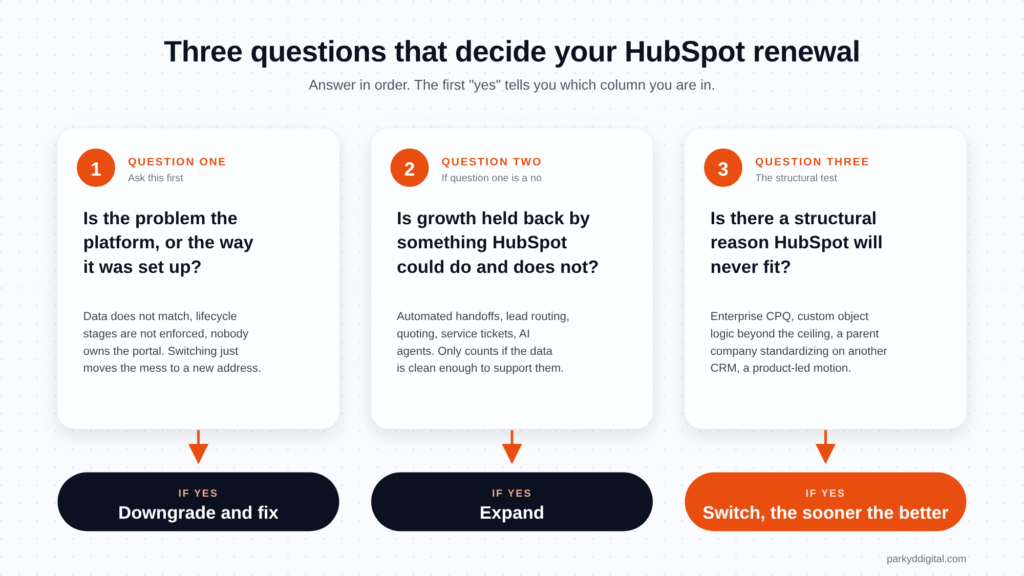
Every renewal outcome falls into one of three columns. These three questions sort yours.
- Is the problem the platform, or the way it was set up? If sales and marketing data do not match, lifecycle stages are not enforced, and nobody owns the portal, switching platforms moves the mess to a new address. That points to downgrade-and-fix, not switch.
- Is revenue growth constrained by something HubSpot could do and currently does not? Automated handoffs, lead routing, quoting, service tickets, AI agents. If yes, and the data is clean enough to support it, that points to expand.
- Is there a structural reason HubSpot will never fit? Enterprise-grade CPQ, heavy custom object logic beyond what HubSpot supports, a parent company standardizing on another CRM, or a product-led motion HubSpot handles poorly. If yes, that points to switch, and the sooner the better.
Column one: expand
When it is the right call
Expansion makes sense when the five numbers above are healthy, pipeline attribution is credible, and the growth plan needs capabilities you are not licensed for. Common 2026 triggers: adding Service Hub so support history lives beside sales history, moving from Starter to Professional to unlock workflows, or turning on agents that need Professional or Enterprise to run.
What to negotiate
- Multi-year terms in exchange for a capped renewal increase. A capped increase is worth more than a discount on year one.
- Onboarding fees. HubSpot’s own onboarding is mandatory on some tiers but can be delivered by a Solutions Partner instead, usually with more hands-on configuration for the same spend.
- Seat ramps. If you are hiring, ask for seats that activate quarterly rather than paying for twelve months of empty chairs.
Expansion fails when the new hub is bought and never configured. If you are moving tiers or adding a hub, scope the setup work before signing. Our HubSpot onboarding and implementation work exists because most expansion disappointment is an implementation gap, not a product gap.
Column two: downgrade
When it is the right call
Downgrading is the most under-used option and the one HubSpot’s sales team will not volunteer. It is right when seats are dormant, a hub is idle, or the contact tier is oversized. It is also the correct first step when the real problem is data quality: fix the portal on a smaller footprint, then expand once the numbers mean something.
Where the money usually is
- Dormant paid seats. Executives, finance and anyone who only reads dashboards can move to free View-Only Seats. Sales Seats belong only to people who use sequences, calling or forecasting. A 10 percent seat cleanup is common; 30 percent is not rare.
- Idle hubs. A Service Hub bought for a ticketing project that never launched, or a Content Hub paid for alongside a WordPress site nobody migrated.
- Contact tier. Marketing contacts you never email are still counted. Unsubscribed, bounced and dead-company records can be set to non-marketing before the renewal date.
- Credit packs. If a single agent is consuming most of the allowance, decide whether the output justifies it before buying more. HubSpot reported that its Customer Agent alone accounted for roughly 60 percent of credits consumed across customers in late 2025.
The timing trap
Seat and tier reductions normally take effect at the next renewal date, not when you request them. Miss the window and you carry the cost for another year. That is why this checklist starts at 90 days, and why the cleanup work (duplicate companies, dead contacts, unowned records) should be finished before the renewal, not after. Our HubSpot CRM cleanup engagements are usually scoped to land four to six weeks ahead of a renewal date for exactly this reason.
Column three: switch
The honest case for leaving
A partner that only ever recommends staying is not giving advice. Switching is right when there is a structural mismatch: your sales process needs configuration HubSpot cannot support, a merger is standardizing the group on Salesforce or Dynamics, or you have outgrown the ceiling on custom objects, permissions or reporting granularity. In those cases, every renewal you sign makes the eventual migration more expensive.
The true cost of switching
Most switch decisions underestimate three costs: the migration itself (data mapping, historical activity, attachments, integrations), the retraining of a sales team that has muscle memory in HubSpot, and the six to nine months of degraded reporting while the new system fills with history. Price those against the renewal delta before deciding. A 15 percent saving on licence fees rarely covers a migration.
The switch that is really a setup problem
The most common switch we are asked about is the reverse direction: companies leaving Salesforce, Pardot or Marketo because the tool became an expensive admin project. The lesson applies in both directions. If the complaint is ‘nobody uses it’, ‘the data is wrong’ or ‘we cannot get a report’, the platform is rarely the cause. Our HubSpot migration services start with a data-quality review for that reason: a migration that carries dirty data across just produces a cleaner-looking version of the same problem.
Credits, explained for the person who signs the invoice
HubSpot Credits are the newest cost lever and the least understood. Three things a CEO or CFO needs to know:
- What consumes them. AI agents (Customer Agent, Prospecting Agent, Data Agent, the new marketing agents), some data enrichment, intent monitoring, and a defined set of AI-powered workflow actions. Ordinary CRM use, email sends in North America and standard workflows do not, as of October 2026.
- How they are priced. Published rates at the time of writing put the Customer Agent at roughly 50 credits per resolved conversation and the Prospecting Agent at roughly 100 credits per recommended lead. Rates change; check your billing page, not a blog.
- Why they matter at renewal. The included allowance resets monthly and does not roll over. If your team is buying packs mid-month, the renewal is the moment to either negotiate a larger allowance or decide the agent is not earning its keep. An agent working on dirty CRM data burns credits producing confident wrong answers; fix the data first.
If you want agents to actually do the work HubSpot promises, the portal needs enforced lifecycle stages, deduplicated records and documented processes. That is HubSpot automation groundwork, and it is a better use of this renewal cycle than buying credits for agents the portal cannot support.
The CEO’s renewal checklist
Print this, or forward it to whoever owns the portal with a two-week deadline.
# | Check | Done |
1 | Renewal date confirmed and a 90-day working-back calendar created | ☐ |
2 | Seat list reviewed: every paid seat has logged in within 60 days or is flagged for removal | ☐ |
3 | Executives and read-only users moved to View-Only Seats | ☐ |
4 | Marketing contact count reconciled against the tier; dead and bounced contacts set to non-marketing | ☐ |
5 | Each hub on the invoice mapped to at least one live, measurable use | ☐ |
6 | Credit consumption by agent reviewed; packs purchased in the last 12 months totalled | ☐ |
7 | Pipeline and closed-won revenue attributed to HubSpot produced and believed by sales, marketing and finance | ☐ |
8 | The three sorting questions answered in writing, with the column chosen | ☐ |
9 | If expanding: setup scope and owner agreed before signature | ☐ |
10 | If switching: full migration cost modelled, including retraining and reporting gap | ☐ |
11 | Negotiation asks drafted: capped increase, seat ramp, onboarding alternative, multi-year terms | ☐ |
12 | Second opinion obtained from someone who does not earn commission on the outcome | ☐ |
What to do this week
Find the renewal date. Ask for the five numbers. Book thirty minutes with whoever can answer the three sorting questions. Most leadership teams discover in that meeting that the portal has never been reviewed as a business system, only as a software subscription. That discovery, three months before the renewal, is worth more than any discount HubSpot will offer you.
Get a second opinion before you sign
We review renewal quotes for B2B companies across Canada and the USA. In 19 minutes we will tell you which column you are in, where the dormant spend is, and whether the quote in front of you is worth signing as written. No audit, no pitch deck, just the numbers.
Book your 19-minute renewal review
Frequently asked questions
Can I reduce HubSpot seats before my renewal?
You can request the reduction at any time, but billing changes normally apply from the renewal date. Review seats at least 90 days out so the reduction is reflected in the renewal quote.
Does HubSpot raise prices at renewal?
HubSpot has stated that renewal pricing increases contributed up to 5 percent in recent periods. Multi-year terms with a capped increase are the usual way to control this.
Are HubSpot Credits mandatory?
Professional and Enterprise tiers include a monthly allowance. You only pay more if you buy additional packs. Credits are consumed mainly by AI agents and enrichment, so a portal that does not use agents may never exceed the allowance.
Should we switch from HubSpot to save money?
Only when there is a structural mismatch between your sales process and the platform. If the complaint is low adoption, bad data or missing reports, the cause is usually setup, and switching moves the problem rather than solving it.
What is the difference between a Core Seat and a Sales Seat?
Core Seats give edit access across the hubs you own. Sales and Service Seats add the specialist tools (sequences, calling, forecasting, ticket routing). View-Only Seats are free and unlimited on paid plans and are right for anyone who only needs to read dashboards